
DSTV PVR: The Complete Guide to Features, Costs, Installation, and Setup in South Africa
Introduction
A DStv PVR (Personal Video Recorder) is designed to give you complete control over your television viewing experience. You can record your favorite shows, movies, and sports events. Additionally, you can pause, rewind, and schedule recordings with ease. This means you never have to worry about missing important entertainment again.
Whether you are considering a DStv PVR for your home, upgrading from an older decoder, or looking for professional installation services, understanding the costs, features, and setup process is essential. In this guide, we’ll explain everything you need to know about DStv PVR technology, how it works, what it costs, and how to get it installed correctly.
For expert DStv PVR installation and support in Cape Town and surrounding areas, contact DStv Installation Cape Town at 066 311 4258 or email info@dstvinstallationincapetown.co.za.
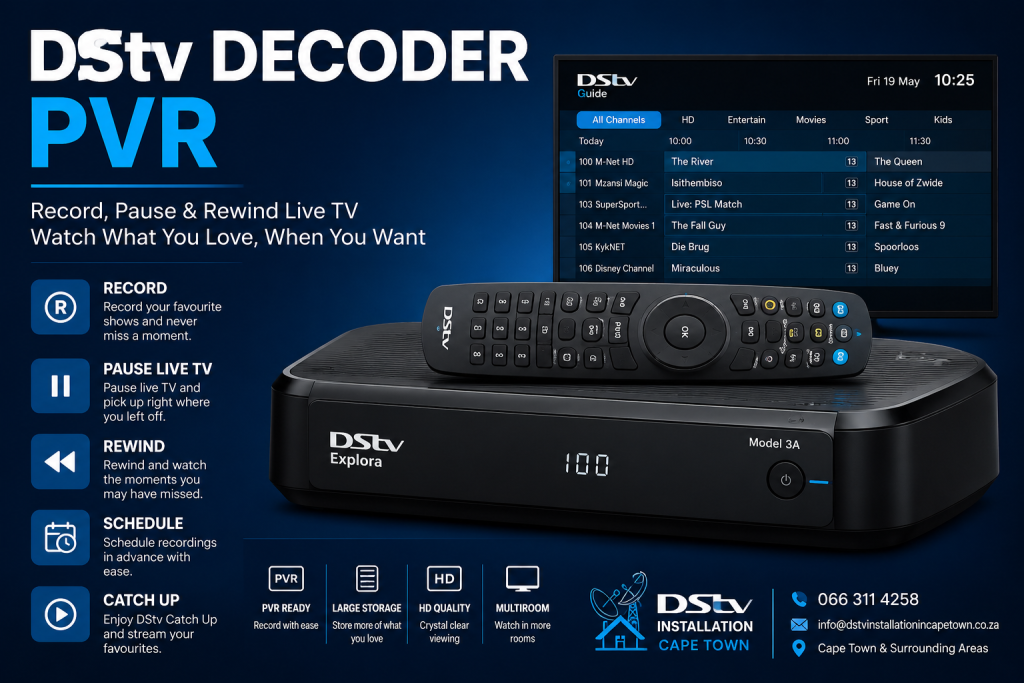
A DStv PVR (Personal Video Recorder) lets you record live TV, pause and rewind, and store programmes to watch later. It is one of the main reasons people upgrade from a basic DStv HD decoder to an Explora. Here is what you need to know about DStv PVR features, pricing, and setup.
Which DStv Decoders Have PVR?
- DStv Explora 3A — the current workhorse PVR decoder. 2TB internal hard drive, records up to 220 hours of HD content. Price: R2,499–R3,499.
- DStv Explora Ultra — adds 4K support and built-in streaming. Price: R4,499–R5,499.
- DStv Streama — hybrid satellite/streaming decoder. Can record via satellite but also streams without a dish. Price: R3,999–R4,999.
- DStv HD decoder (single view) — does NOT have PVR. No recording, no pause, no rewind. Price: R599–R799.
Prices are approximate 2026 South African retail.
What Can a DStv PVR Do?
- Record live TV — set a recording for any channel in your package, either a single programme or a full series
- Record two channels simultaneously — the Explora has a dual tuner powered by a Smart LNB, so you can watch one channel while recording another
- Pause and rewind live TV — pause for up to 2 hours and resume from where you left off
- Series recording — set it once and the Explora records every new episode automatically
- Catch Up — access on-demand content from the last 4–7 days without recording
- BoxOffice — rent movies directly from the decoder (requires internet connection)
DStv PVR Setup Requirements
To use PVR recording on a DStv Explora, you need:
- Smart LNB — the Explora’s dual tuner requires a Smart LNB, not a standard single LNB
- 90cm satellite dish — properly aligned for full signal on both tuners
- RG6 coaxial cable — a single cable run from the Smart LNB to the Explora
- Active DStv subscription — you can only record channels in your current package
If you are upgrading from an HD decoder to an Explora, you may need a new LNB and possibly a new cable run. A DStv technician can assess your existing setup and upgrade only what is needed.
Common DStv PVR Problems
- Recording fails — usually a signal issue. If signal drops during recording, the recording file will be incomplete. Check signal strength.
- Hard drive full — delete old recordings or connect an external USB hard drive for additional storage.
- Hard drive failure — the internal drive can fail after 3–5 years of constant use. The Explora will show an error message. The drive can be replaced.
- Can’t record two channels — this usually means the Smart LNB is not installed or is faulty. A standard LNB only feeds one tuner.
PVR vs Streaming: Which Is Better?
PVR recording gives you guaranteed access to content regardless of internet speed or availability. Streaming (via DStv Stream app or Streama decoder) requires internet and uses data. For reliable recording in South Africa — where internet and power outages are common — a satellite PVR is still the most dependable option. Read: Do you need a decoder to use DStv streaming? Full PVR specifications and pricing are available on the official DStv decoder page.
Need a DStv pro in Cape Town?
- DStv installers near me — certified local technicians across Cape Town
- DStv technician near me — book a skilled tech today
- DStv repairs near me — fast signal and decoder fixes
- DStv dish installation prices — 2026 Cape Town price guide
- DStv contact number Cape Town — local installer and repair line
More Cape Town DStv guides
- DStv Explora vs HD Decoder: The Best Simple 2026 Guide
- How to Reset or Restart a DStv Decoder Correctly
- DStv Decoder Stuck on the Boot Screen? Here Is Why and How to Fix It
- How to Fix a DStv Decoder That Won’t Turn On — Step-by-Step Cape Town Guide
- DStv Hard Drive Failing or Showing an Error? What to Do Next
- What to Check When Your DStv Smartcard Has an Error
- How Much Does DStv Installation Cost in Cape Town? Your Complete 2026 Guide
Final Verdict: Is a DStv PVR Worth It for Your Home Entertainment Setup?
Without a doubt, a DStv PVR is a valuable investment for anyone who wants more control, convenience, and flexibility when watching television. It allows you to record your favorite programs, pause and rewind live TV, and schedule recordings in advance.
This ensures that you never miss important sporting events, movies, or series. A professionally installed DStv PVR can significantly enhance your viewing experience while delivering long-term value for your household.
If you are considering a DStv PVR installation, upgrade, or setup in Cape Town, trust DStv Installation Cape Town for expert advice, reliable workmanship, and fast service. Call 066 311 4258 or email info@dstvinstallationincapetown.co.za today to get your DStv PVR installed and running perfectly.